Simplifying Cognitive Services App Development using Portable Class Libraries
This hands-on lab guides you through creating an intelligent console application from end-to-end using Cognitive Services (specifically the Computer Vision API). We use the ImageProcessing portable class library (PCL), discussing its contents and how to use it in your own applications.
Objectives
In this workshop, you will:
- Learn about the various Cognitive Services APIs
- Understand how to configure your apps to call Cognitive Services
- Build an application that calls various Cognitive Services APIs (specifically Computer Vision) in .NET applications
While there is a focus on Cognitive Services, you will also leverage the following technologies:
- Visual Studio 2017, Community Edition
- Cosmos DB
- Azure Storage
- Data Science Virtual Machine
Prerequisites
This workshop is meant for an AI Developer on Azure. Since this is only a short workshop, there are certain things you need before you arrive.
Firstly, you should have experience with Visual Studio. We will be using it for everything we are building in the workshop, so you should be familiar with how to use it to create applications. Additionally, this is not a class where we teach you how to code or develop applications. We assume you have some familiarity with C# (you can learn here), but you do not know how to implement solutions with Cognitive Services.
Secondly, you should have experience with the portal and be able to create resources (and spend money) on Azure.
Finally, before arriving at the workshop, we expect you to have completed 1_Setup.
Introduction
We’re going to build an end-to-end application that allows you to pull in your own pictures, use Cognitive Services to obtain a caption and some tags about the images, and then store that information in Cosmos DB. In later labs, we will use the NoSQL Store (Cosmos DB) to populate an Azure Search index, and then build a Bot Framework bot using LUIS to allow easy, targeted querying.
Architecture
We will build a simple C# application that allows you to ingest pictures from your local drive, then invoke the Computer Vision API to analyze the images and obtain tags and a description.
Once we have this data, we process it to pull out the details we need, and store it all into Cosmos DB, our NoSQL PaaS offering.
In the continuation of this lab throughout the workshop, we’ll build an Azure Search Index (Azure Search is our PaaS offering for faceted, fault-tolerant search - think Elastic Search without the management overhead) on top of Cosmos DB. We’ll show you how to query your data, and then build a Bot Framework bot to query it. Finally, we’ll extend this bot with LUIS to automatically derive intent from your queries and use those to direct your searches intelligently.
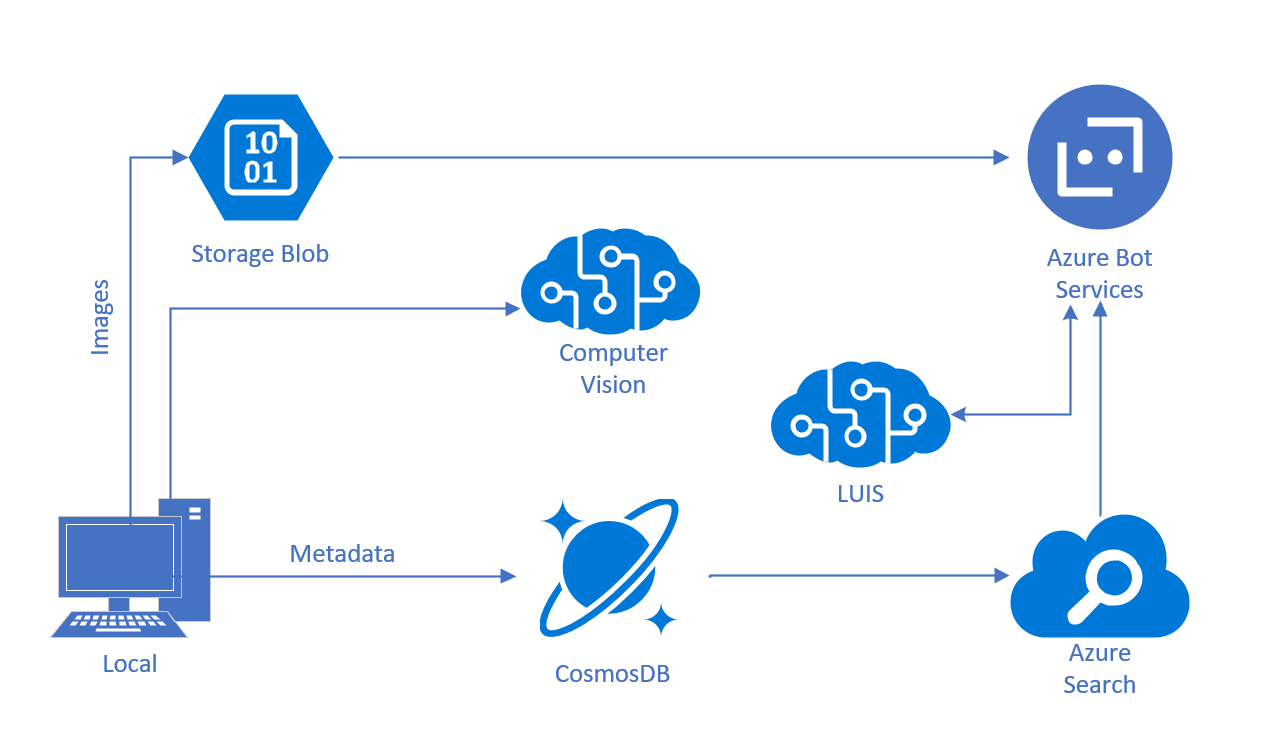
This lab was modified from this Cognitive Services Tutorial.
Navigating the GitHub
There are several directories in the resources folder:
- assets: This contains all of the images for the lab manual. You can ignore this folder, unless you are looking for an older version of this lab, which you can find under PreviousVersionLabs.
- code: In here, there are several directories that we will use:
- Starting-ImageProcessing and Finished-ImageProcessing: There is a folder for starting, which you should use if you are going through the labs, but there is also a finished folder if you get stuck or run out of time. Each folder contains a solution (.sln) that has several different projects for the workshop, let’s take a high level look at them:
- ProcessingLibrary: This is a Portable Class Library (PCL) containing helper classes for accessing the various Cognitive Services related to Vision, and some “Insights” classes for encapsulating the results.
- ImageStorageLibrary: This is a non-portable library for accessing Blob Storage and Cosmos DB.
- TestCLI: A Console application allowing you to call the Computer Vision Cognitive Service and then upload the images and data to Azure. Images are uploaded to Blob Storage, and the various metadata (tags, captions, image ids) are uploaded to Cosmos DB.
TestCLI contains a
settings.jsonfile containing the various keys and endpoints needed for accessing the Cognitive Services and Azure. It starts blank, so once you provision your resources, we will grab your service keys and set up your storage account and Cosmos DB instance.
- Starting-ImageProcessing and Finished-ImageProcessing: There is a folder for starting, which you should use if you are going through the labs, but there is also a finished folder if you get stuck or run out of time. Each folder contains a solution (.sln) that has several different projects for the workshop, let’s take a high level look at them:
Navigating the Labs
This workshop has been broken down into five sections:
- 1_Setup: Here we’ll get everything set up for you to perform these labs - Azure, a Data Science Virtual Machine, and Keys you’ll need throughout the workshop. This should be done prior to attending class
- 2_ImageProcessor: You’ll learn about portable class libraries and how to build an image processor from service helpers
- 3_TestCLI: Here we’ll call the Computer Vision API and load our images into Cosmos DB and Azure Storage using a console application
- 4_Challenge_and_Closing: If you get through all the labs, try this challenge. You will also find a summary of what you’ve done and where to learn more